Reproducible projects in R require three things to be explicit and stable:
- Package state - which packages and versions are used
- Filesystem layout - where data, outputs, configuration, and code live
- Execution entry points - which scripts define the workflow
General-purpose tools such as renv, usethis, or here address parts of this problem.
Project-template packages like tinyProject, prodigenr, or workflowr provide predefined directory layouts and conventions.
link2GI addresses a more specific use case: projects that combine R with external command-line geospatial software (e.g. GDAL, OTB, GRASS, SAGA) and therefore depend on a strict and reproducible directory and configuration structure across operating systems.
Using the RStudio GUI
Using RStudio, a new project can be created by simply selecting the Create Project Structure (link2GI) template from the ***File -> New Project -> New Directory -> New Project Wizard *** dialogue.
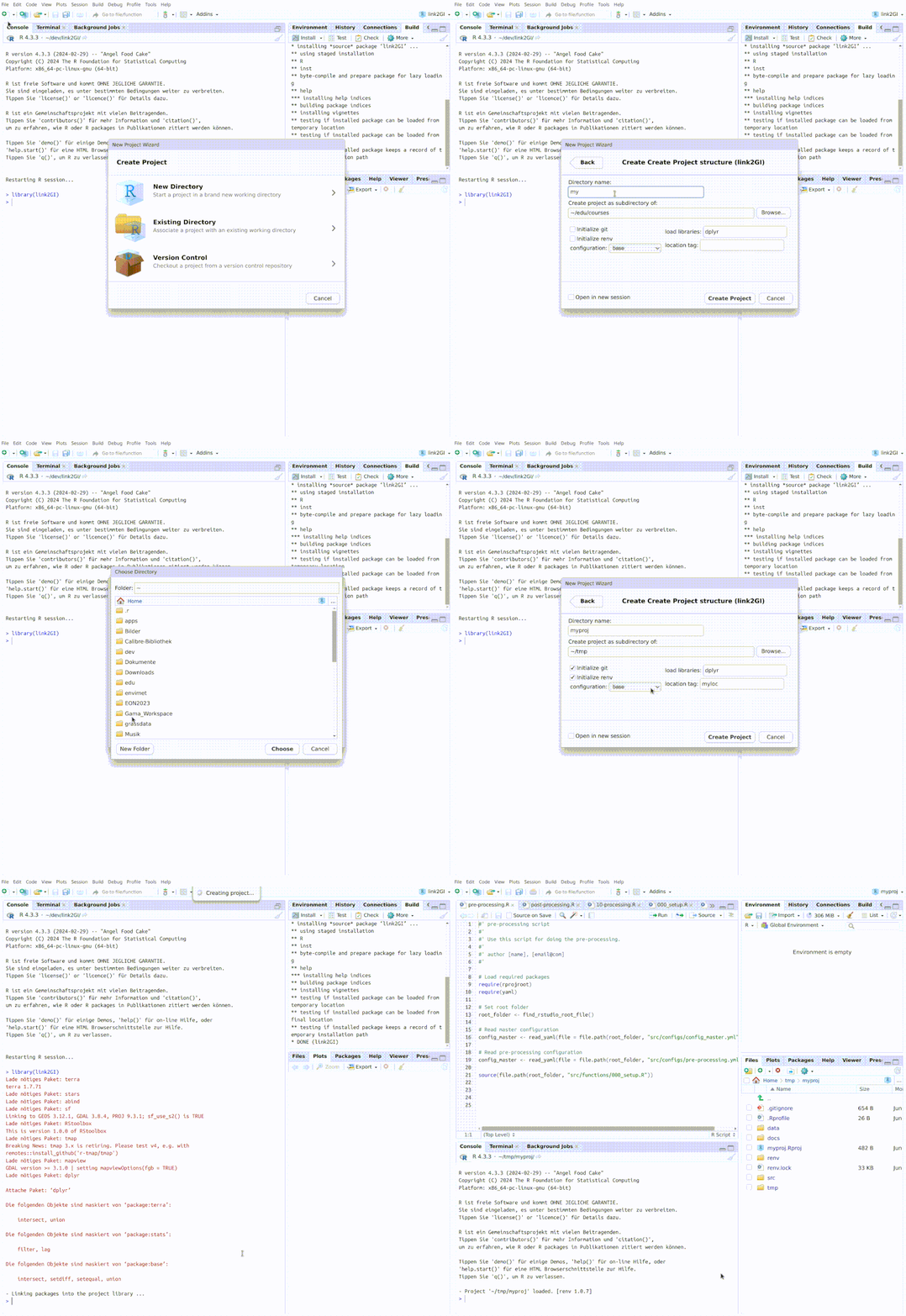
Console Best-Practice Workflow
This section provides a minimal, canonical workflow for spatial R projects using link2GI. It is intended as a quick entry point before the more detailed explanations below. However it will cover most standard demands
Minimal recommended lifecycle
-
Once: create the project
library(link2GI) initProj("~/projects/example", standard_setup = "baseSpatial") -
Always: inside the project
source("src/functions/000_setup.R")
Ad 1 - Project creation
Run outside the project directory. This creates:
- a fixed folder structure
- an RStudio project
- optional Git repository
- optional
renvenvironment - skeleton scripts and configuration files
- opens the Rstudio session
library(link2GI)

initProj(
  root_folder    = "~/projects/my_spatial_project",
  standard_setup = "baseSpatial",
  init_git       = TRUE,
  init_renv      = TRUE
)
Ad 2 - Project entry point
After opening the project, define your root_folder and run the created setup script. This defines:
- all project paths (
dirs) - required libraries
- sourced helper functions
root_folder <-  getwd()
source("src/functions/000_setup.R")
Important restrictions
- Do not call
initProj()again — this duplicates folder-creation logic.- Do not use
setwd().- Do not hard-code absolute paths.
- Do not mix setup code with analysis logic.
Comprehensive Workflow Description and Design Principles
initProj()creates a project once.setupProj()reconstructs its environment every time.
All advanced features described below build on this principle.
Scope of initProj() in link2GI
initProj() is a project creation function, not a general runtime setup tool.
It is designed to be executed once per project, at creation time. Its responsibilities are limited to:
- creating a defined folder hierarchy,
- generating initial scripts and configuration files,
- optionally initializing
gitandrenv, - writing an RStudio project file,
- selecting a predefined structural setup (
base,baseSpatial,advancedSpatial, or YAML-based).
After this step, the project exists as a static on-disk structure.
Separation of responsibilities: initProj() vs setupProj()
A core design decision in link2GI is the strict separation between project creation and project runtime setup.
| Function | Purpose |
|---|---|
initProj() |
Create a new project on disk |
setupProj() |
Re-create the runtime environment of an existing project |
initProj()
- must be run outside the project directory,
- creates folders, scripts, and configuration files,
- must not be called again inside an existing project.
Calling initProj() from inside a project directory will create nested duplicate folder trees. This behaviour is intentional given its role as a project generator.
setupProj()
- is intended to be called inside an existing project,
- ensures required folders exist,
- loads libraries,
- sources project-specific functions,
- returns the
dirsobject.
All runtime scripts (e.g. main-control.R, processing scripts, Quarto documents) should rely on setupProj()—never on initProj().
Default setups and configuration-driven structure
link2GI ships with predefined structural setups stored in a YAML configuration file. These setups define:
- logical data subfolders (
dataFolder), - documentation folders (
docsFolder), - temporary folders (
tmpFolder), - code locations (
code_subfolder), - required libraries,
- optional
gitandrenvinitialisation.
Defaults can be inspected programmatically:
setup_default()
setup_default()$baseSpatial
The defaults are declarative: they describe structure, not behaviour.
Creating a project from the console
A minimal example using a predefined setup:
root_folder <- tempdir()
dirs <- initProj(
  root_folder    = root_folder,
  standard_setup = "baseSpatial"
)
This creates the full directory structure, initial scripts, and configuration files.
Customising a project at creation time
Defaults can be extended during project creation:
dirs <- initProj(
  root_folder    = "~/projects/my_project",
  standard_setup = "baseSpatial",
  folders        = c("data/raw/provider1", "docs/quarto"),
  init_git       = TRUE,
  init_renv      = TRUE
)
This creates a project whose structure is the union of the selected default and the explicitly provided additions.
Location tags (loc_name)
The optional loc_name argument introduces a second hierarchy level below data/, docs/, and tmp/.
This is intended for workflows where a single project manages multiple spatial sites or regions.
If this distinction is not required, loc_name should be left NULL.
The role of src/functions/000_setup.R
Every link2GI project contains a single environment bootstrap script:
src/functions/000_setup.R
This script is a contract, not an example.
Its responsibilities are:
- define the project root folder,
- define relative folder paths,
- call
setupProj()once, - return the resulting
dirsobject.
Important restrictions
- call
initProj()again — this duplicates folder-creation logic.- use
setwd().- hard-code absolute paths.
- mix setup code with analysis logic.
A minimal, correct structure is:
root_folder <- normalizePath(getwd(), winslash = "/", mustWork = TRUE)

dirs <- setupProj(
  root_folder    = root_folder,
  folders        = c("data/source", "data/results", "docs/figures", "tmp"),
  code_subfolder = c("src", "src/functions", "src/configs"),
  libs           = c("terra", "sf", "dplyr", "link2GI"),
  fcts_folder    = file.path(root_folder, "src", "functions")
)

dirs
Template system and file generation
initProj() generates project files by applying brew::brew() to templates shipped with the package.
Templates are responsible only for writing files, not for managing runtime state.
Each project uses exactly one setup template (selected via standard_setup) to generate 000_setup.R.
Maintaining multiple near-identical setup templates is discouraged. A recommended pattern is:
- one canonical setup template,
- multiple YAML presets describing different folder and library combinations.
Common failure modes
Nested project directories
If a structure like this appears:
project/
  data/
  src/
  project/
    data/
    src/
then initProj() was executed inside an existing project or with an incorrect root_folder.
This is expected behaviour for a project generator.
dirs pointing to unexpected locations
If dirs contains absolute paths outside the project directory, verify that:
root_folderis set togetwd()in000_setup.R,- folder definitions are relative, not absolute.